2025-07-30 02:21:10
4k
213
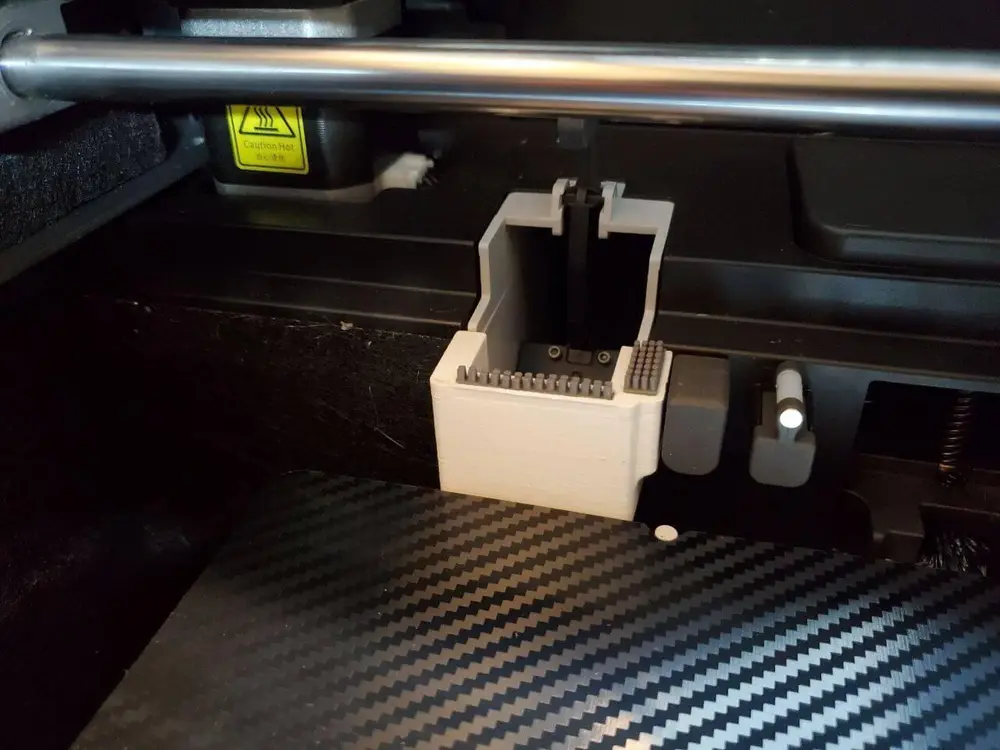
Grandma's Favorite Poopcatcher and Nozzlewiper Combo for the Kobra S1 and S1C

@Gwebster_1536261
Donate
Message
Follow
Recommended printing method
Add
A1 mini Cutter thanks M4d53
Kobra S1
Kobra S1 Max
、
Kobra 3
、
Kobra 2
、
Kobra 4
、
Kobra X
、
Kobra 3 V2
、
Kobra 3 Max
、
Kobra 2 Max
、
Kobra 2 Pro
、
Kobra 2 Neo
、
Kobra 2 Plus
/ Plates:1
/ 14m
Grandmas Favourite Nozzle Wiper
Kobra S1
Kobra S1 Max
、
Kobra 3
、
Kobra 2
、
Kobra 4
、
Kobra X
、
Kobra 3 V2
、
Kobra 3 Max
、
Kobra 2 Max
、
Kobra 2 Pro
、
Kobra 2 Neo
、
Kobra 2 Plus
/ Plates:1
/ 34m
Support version Grandma's Nozzlewiper
Kobra S1
Kobra S1 Max
、
Kobra 3
、
Kobra 2
、
Kobra 4
、
Kobra X
、
Kobra 3 V2
、
Kobra 3 Max
、
Kobra 2 Max
、
Kobra 2 Pro
、
Kobra 2 Neo
、
Kobra 2 Plus
/ Plates:1
/ 34m
71
Share


Description
Vanilla-Klipper: If you are using vanilla Klipper on your S1 and want on this Wiper optimized Wipe logic
let me know, I am using a custom one
Hybrid Design: A1 Mini Silicone & Original Metal Scraper
Hi! After a long development phase and many prototypes, I am excited to share this nozzle wiper with you. It has been thoroughly tested to ensure the best cleaning results for your Kobra S1. 😊
IMPORTANT: Safety Check
Before your first print, please perform a manual check:
- Ensure the wiper is fully inserted.
- Verify that there is a gap between the nozzle and the plastic parts to prevent melting.
Printing Instructions
- Material: I highly recommend PETG, ABS, or ASA. Avoid PLA due to the heat.
- Supports: Designed to print without supports.
- Note: If your printer struggles with bridging, please add manual supports.
- Z-Offset: If you use my print profile, always double-check your Z-offset before starting!
 Assembly & Modification
This system combines A1 Mini silicone brushes with the original metal scraper from your S1.
- Prepare the Brushes: Both silicone brushes must be shortened in height.
- Tip: Use the Nozzle thanks to the help of M4d53 for the perfect height.
- Trim one brush in length and the other in width by half.
 Installation: Glue the silicone brushes in with rubber adhesive or superglue.
- Metal Scraper: Insert the metal scraper into the dedicated slot. A drop of superglue ensures it stays put.
Expert Tips: Removal & Maintenance
- Removing the Original Metal Scraper: To remove the scraper from the stock "poop shoot," apply some Isopropanol to the adhesive area. Let it soak for a while to loosen the glue, then gently pry it off with a spatula.
- Removing the Entire Unit: 1. Move the heatbed manually until it is slightly underneath the wiper/catcher. 2. Slide a spatula between the bed and the catcher. 3. Slowly manually raise the bed (Z-axis). The bed's movement will safely push the unit upwards and out of its mount.
- How do I get the metal scraper back ? : lightly warm the metal with a lighter. Once the surrounding plastic softens, you can easily lever the scraper out with a screwdriver.
Credits
Inspired by the great work of:
I hope you are as happy with the results as I am :)
Tags
License