
Kobra S1 Quality Profiles V2


Thank you for visiting to my version 2 of Anycubic Kobra S1 quality profiles.
According to new tests and some tipps of you guys, I have created new profiles with better z seam, infill settings ...
How do you save the settings for other prints? Here is what you need to do.
Step 1: Download and open the 3MF file which I provided.
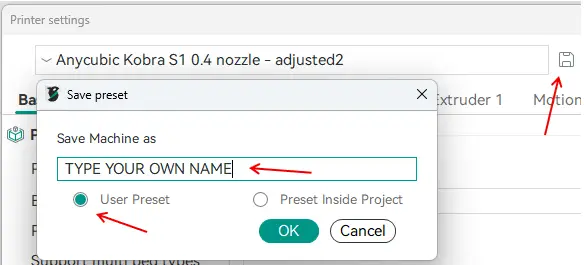
Step 2: Go to the printer settings -> klick on save -> !IMPORTANT! give the profile your own name and choose the user presets option
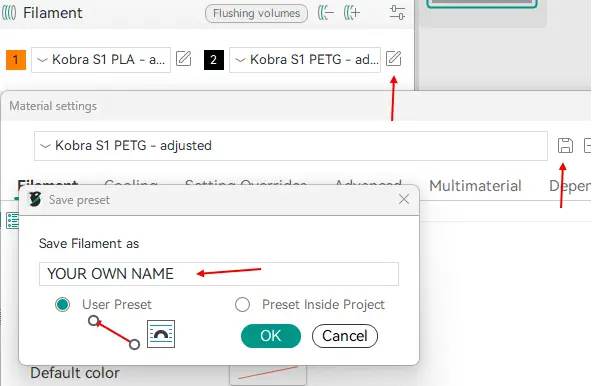
Step 3: Go to the filaments and select PLA or PETG profil -> klick on edit -> klick on save -> !IMPORTANT! type in your own name and choose the user presets option
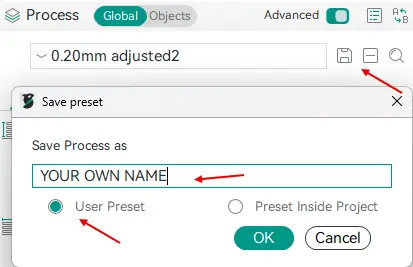
 Step 4: select each process profil you want -> klick on save -> !IMPORTANT! type in your own name and choose the user presets option
If you go now to another project, all the settings should be available there too. Have fun to try it!
You are prohibited from sharing, sub-licensing, selling, renting, hosting, transferring, or distributing the digital file or 3D printed versions of this object, as well as any other derivative work in either digital or physical form (including remixes).You are not allowed to use the objects in any manner that involves charging money or collecting fees without permission.