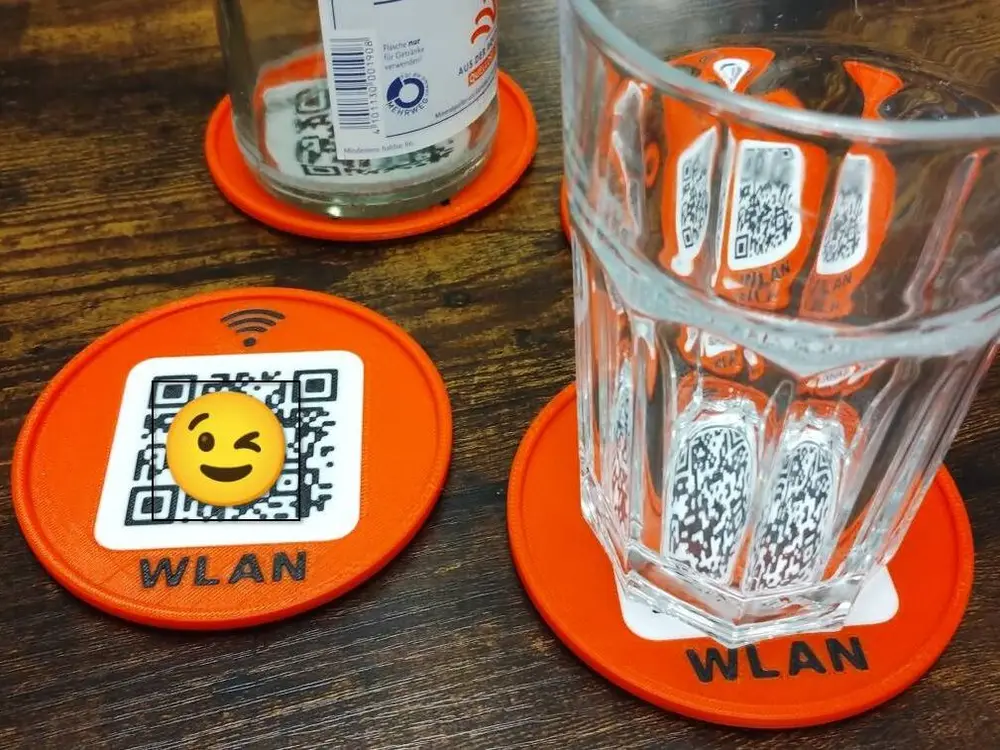
Coasters with QR-Code to guest WIFI


# Guest WiFi Coasters — with a QR code your visitors can actually scan
Four glass coasters and a matching stand. Each coaster carries a QR code for
your guest network: point a phone at it, tap connect, done. No more spelling
out a 20-character password across the dinner table.
**One thing to sort out before you print:** the QR code is baked into the
geometry, not printed on a sticker. The files here contain a **placeholder
network** — SSID `WIFI GUEST`, password `Passv0id`. You have two options:
1. **Regenerate the model with your own credentials.** An AI assistant such as
Claude will walk you through it — the whole thing is one command.
2. **Use the placeholder as your guest network.** Set your router's guest
SSID to `WIFI GUEST` and the password to `Passv0id`, and the printed
coasters work as they are. Less elegant, but it takes two minutes and no
tooling.
## What is in the files
| File | Contents |
|---|---|
| `WIFI-Coaster-4x.3mf` | four coasters, 224 × 224 mm on the plate |
| `WIFI-Coaster-1x.3mf` | a single coaster, for a test print |
| `WIFI-Stand.3mf` | the stand, holds 12 coasters, single colour |
Filament slots: **1 = black, 2 = white, 3 = body colour.** The body colour is
free; the preview shows orange.
## Why there is a white field behind the code
QR scanners read luminance, not colour. Black on a red or orange body gives
about 3.4:1 contrast — right at the practical limit, and it fails in dim
light. Black on white gives 16.9:1. That is the only reason for the white
rectangle: it costs 3 g of filament and turns a code that sometimes works
into one that always does.
The code is QR version 3, 29 × 29 modules at 1.55 mm each, with a 6.2 mm
quiet zone. That module size is deliberate: below roughly 1 mm a 0.4 mm
nozzle can no longer draw the modules cleanly.
## The underside
The coasters stack. A foot ring stands 1.6 mm proud and drops into the recess
of the coaster below, so a stack does not slide apart. Thirty-two radial ribs
carry the base and keep the largest unsupported span down to 6.9 mm, which
prints without support. Eight notches let dishwasher water drain out.
The outer bottom edge of the foot ring is chamfered by 0.8 mm at 45°. That
chamfer is not decoration: the first layer of any print is squashed wider
than nominal, and this particular edge decides whether two coasters stack
cleanly. Chamfering it is cheaper than filing the finished part.
## Material
**PETG**, because the coasters are meant to go in the dishwasher — a cycle
runs at 50–70 °C, PLA softens from about 55 °C, PETG from about 80 °C.
PLA works perfectly well if you wash them by hand. If you switch, remember
that all three slots must be the same material: the white field and the
black code are 0.8 mm inlays that hold by fusing to the body, and PLA and
PETG barely bond to each other.
The project files are set up for an **Anycubic Kobra S1** with the ACE unit.
The PETG values in them are Anycubic's own for that printer, not guesswork.
On other machines, load the STLs instead and use your own profile.
## Print notes
- Layer height 0.20 mm, 4 wall loops, 15 % infill.
- No brim. The chamfer already handles the elephant foot, and a brim would
attach exactly to the ring that decides the stacking fit.
- Bed: textured PEI. If parts come loose, wash the plate with dish soap
rather than IPA — PETG does not stick to a slightly greasy sheet.
- Four coasters share one purge tower, so the colour changes cost about 3 g
of flushed filament for the whole plate rather than per part. Printing them
one at a time costs the same 3 g each time.
Roughly 29 g per coaster, 115 g for the stand.