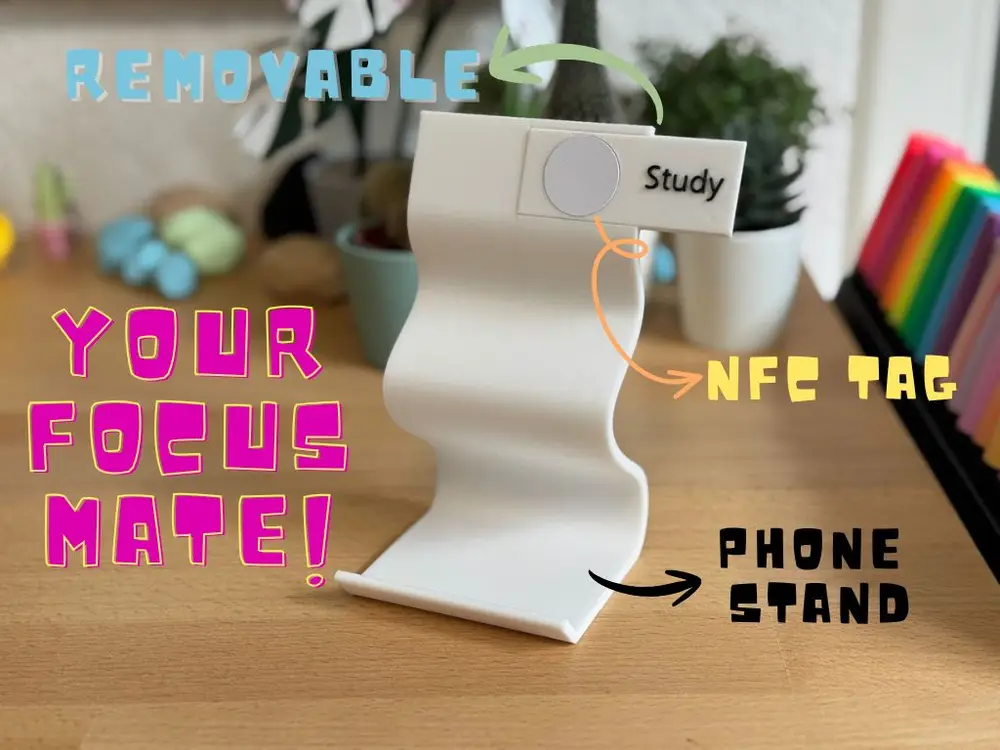
FocusMate NFC Phone Stand


Take your study sessions to the next level with the FocusMate NFC Phone Stand! Designed with a modern, minimalist style, this stand isn’t just sleek—it’s smart. Equipped with a removable and programmable NFC tag, you can instantly set a timer or activate a study mode on your phone with a simple tap, perfectly aligned with the Pomodoro method.
Customize your workflow by programming the tag directly on your phone, or label your tags in the slicer—whether it’s “Study,” “Break,” or any personal focus mode you want. Durable, stylish, and fully functional, the FocusMate NFC Phone Stand is your ideal companion for productive back-to-school days.
How to set up your Pomodoro NFC automation on iPhone:
1. Prepare your NFC tag
Open the Shortcuts app → tap Automation → Create Personal Automation.
Choose NFC → scan your tag → name it (e.g., Pomodoro).
2. Build the 25-minute focus timer
Tap Add Action → search Start Timer.
Set it to 25 minutes.
3. Wait until the timer ends
Add action: Wait → set to 25 minutes.
4. Add the 5-minute break timer
After the Wait step, add Start Timer → set to 5 minutes.
5. (Optional) Notifications
Add an action before each timer: Show Notification (e.g., "Focus started!" / "Break time!").
6. Save
Tap Next → turn off Ask Before Running → Done.
您不得分享、转授权、出售、出租、托管、转让或分发该数字文件或该对象的3D打印版本,以及以数字或物理形式存在的任何其他衍生作品(包括混音)。未经许可,您不得以任何方式使用这些物品进行费用收取。