Kobra S1 Quality Profiles V2


Thank you for visiting to my version 2 of Anycubic Kobra S1 quality profiles.
According to new tests and some tipps of you guys, I have created new profiles with better z seam, infill settings ...
How do you save the settings for other prints? Here is what you need to do.
Step 1: Download and open the 3MF file which I provided.
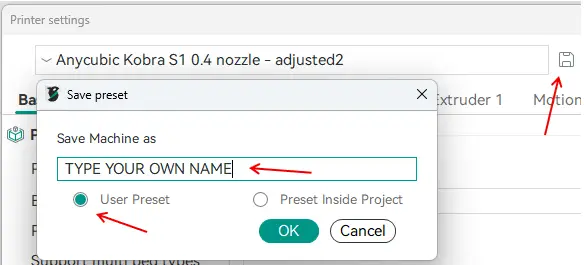
Step 2: Go to the printer settings -> klick on save -> !IMPORTANT! give the profile your own name and choose the user presets option
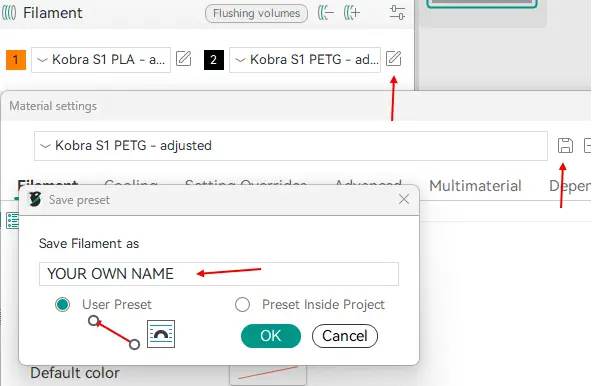
Step 3: Go to the filaments and select PLA or PETG profil -> klick on edit -> klick on save -> !IMPORTANT! type in your own name and choose the user presets option
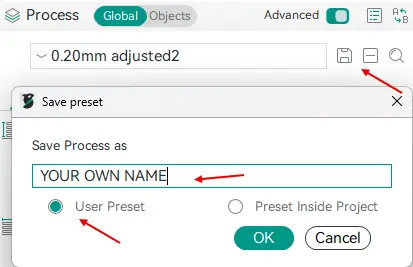
 Step 4: select each process profil you want -> klick on save -> !IMPORTANT! type in your own name and choose the user presets option
If you go now to another project, all the settings should be available there too. Have fun to try it!
您不得分享、转授权、出售、出租、托管、转让或分发该数字文件或该对象的3D打印版本,以及以数字或物理形式存在的任何其他衍生作品(包括混音)。未经许可,您不得以任何方式使用这些物品进行费用收取。