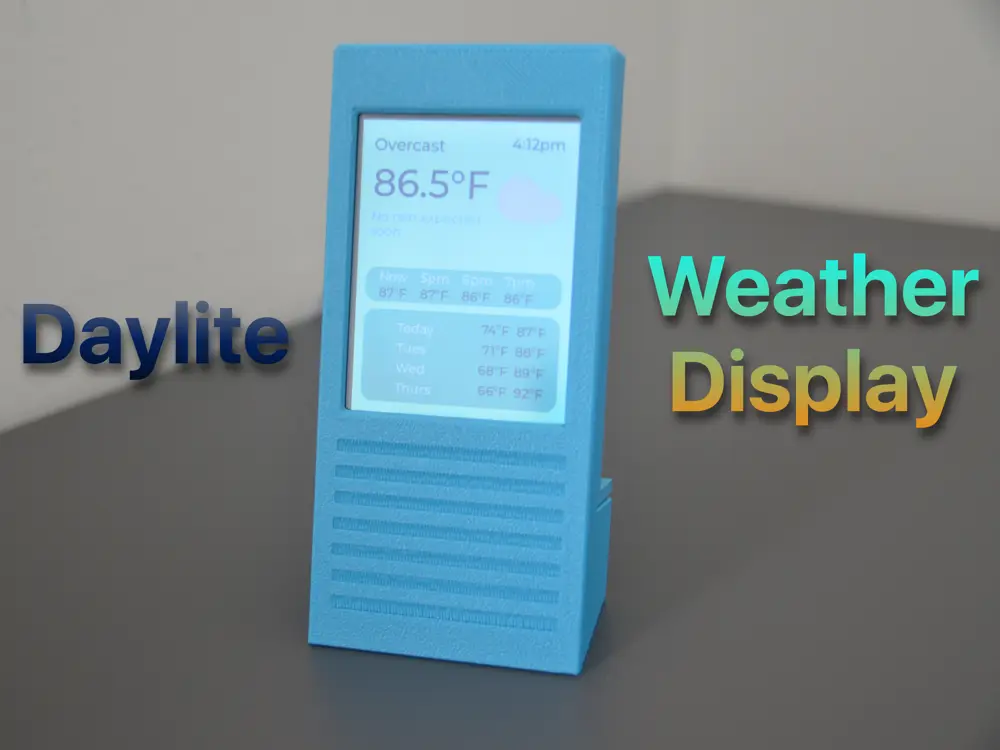
Daylite - Open Source Weather Display


Daylite ESP32 Weather Display: Your Instant Weather Companion
Never step out unprepared again! Daylite delivers real-time forecasts at a glance with a sleek, minimalist design. Perfect for your desk, kitchen, or bedside, it’s the effortless way to stay ahead of the elements—rain or shine.
Why You Will Love Daylite
✅ 5-Minute Setup – No tools, wiring, or soldering!
✅ Budget-Friendly – Build for under $20 with widely available parts.
✅ Open Source & Free – Customize freely or contribute to the code.
✅ Beginner-Friendly – Ideal intro to ESP32, 3D printing, and IoT projects.
✅ Plug & Play – Powered via USB-C/micro-USB.
Parts List
- ESP32-2432S028R Board – 2.8" ILI9341 display (240x320 TFT LCD).
- Buy: Amazon US | AliExpress
- Note: Ensure model ESP32-2432S028R ILI9341 2.8" – clones work if specs match!
- Angled USB Adapter (90°):
- USB-C or Micro-USB (match your board’s port):
- Amazon US | UK
- USB Power Cable – Any standard 5V adapter (e.g., phone charger).
Setup in 3 Simple Steps
Step 1: Flash the Firmware
- Plug your ESP32 board into your computer.
- Visit the Daylite Web Installer:
- 🔗 https://shivam-hegadi.github.io/Daylite-Installation-Wizard/flash.html
- Follow the on-screen guide to install firmware + connect to Wi-Fi.
Step 2: Assemble the Hardware
- Attach the angled USB adapter to the board (facing away from the screen).
- Insert the board into the 3D-printed case (display facing front).
- Snap the back cover closed.
Step 3: Power & Customize
- Plug in USB power – it initially displays a blank screen.
- Connect to WeatherBoxAP on your phone or laptop.
- Connect to your home WiFi from the portal. (if portal does not show up, go to http://192.168.4.1/ )
- Swipe down from the top to open menu. From there, you can choose your location, adjust brightness, enable dark mode, and much more.
Key Features
- 🌦️ Local Forecasts – Pulls data from global weather APIs
- 🖍️ Clean UI – Sleek UI with Light and Dark Mode
- ⏰ Night Mode – Automatically Dims the Screen during the night.
- 🔄 One-Click Updates – Web installer handles all firmware upgrades
- ⚡ Low-Power Draw – Draws <0.5W.
FAQs
Q: What does Daylite access on WiFi?
A: Daylite only connects to the OpenMeteo Weather API. No tracking, accounts, or data logging. You can View source code to verify.
Q: Can I modify the design?
A: Yes! All 3D models and code are in the files!. Resize or remix!
Q: What if my board has a different pin layout?
A: Leave a comment down below and I will give you files with a pin layout customized to your board.
Q: Does it work without constant internet?
A: Yes! Shows cached data, however, it updates the weather every 15 minutes.
Like This Project?
Give it a like and share it with your maker friends!
Get Building Now:
🔧 GitHub Repository | 🔧 Installer
Crafted with ❤️ by Shivam Hegadi