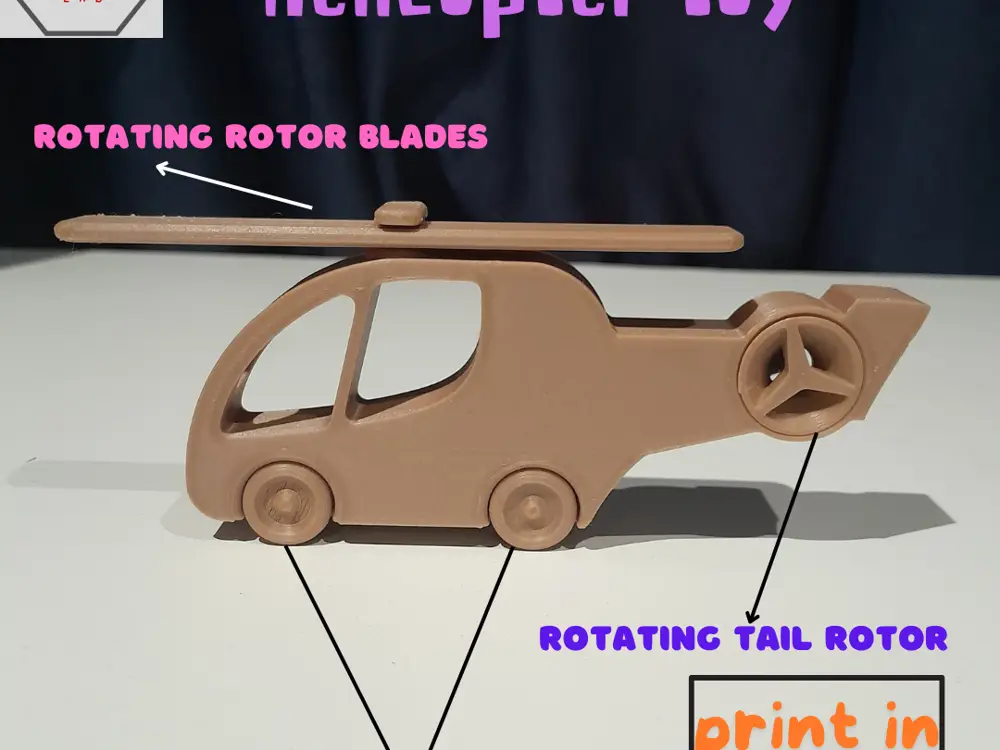
Helicopter toy - Print in place


🚁 Noob3DLab Print-in-Place Helicopter – Ready to Fly Off the Build Plate!
Designed for fun, built for learning — the Noob3DLab Helicopter is a unique print-in-place 3D model that brings aviation excitement to your 3D printer. No supports, no assembly, just print and play!
🔧 Features at a Glance:
- 🖨️ One-Piece Print
- Prints in one go — no assembly required. Just remove it from the bed and it’s ready to roll and spin!
- 🚫 No Supports Needed
- Clean, support-free design means no mess and no post-processing.
- 🔄 Working Rotor Blades
- The rotor blades are fully functional right off the printer — they spin for added realism and fun.
- 🛞 Smooth Rolling Wheels
- Integrated wheels let the helicopter glide across flat surfaces, perfect for interactive play.
- 🧠 Learn Through Play
- Great as a STEM toy, it encourages hands-on exploration and sparks curiosity in young minds.
Perfect for makers of all skill levels, this educational toy is a fun, fast, and functional print that kids and adults alike will love. Just slice, print, and watch it come to life!
🖨️ PLA Print Settings – Print-in-Place Helicopter
Material PLA:
Layer Height: 0.2 mm (0.16 mm if you want smoother detail)
Wall Line Count: 2
Top Layers: 4–5
Bottom Layers: 4–5
Infill: 10–15% (Grid or Lines pattern)
Print Speed: 50 mm/s (go slower for better tolerances)
Nozzle Temp: 200–210°C
Bed Temp: 60°C
Supports: Disabled (Model is designed support-free)
Build Plate Adhesion Skirt or Brim (Brim recommended if small contact area)
Z Hop When Retracted Enabled (to prevent knocking over delicate parts)
Initial Layer Height : 0.2–0.24 mm (for better bed adhesion)
Cooling Fan: ON after first few layers (100%)
🔧 Pro Tips:
Check bed leveling and adhesion before printing. A poor first layer can affect how well the rotors and wheels turn.
Print at 100% or more scale to preserve tolerances — shrinking might fuse parts. or scale
If parts don’t move freely post-print, gently twist or tap the rotors/wheels to loosen — but don’t force them.